Comparison
ALL360teamviewer
Reach your home from anywhere, without a remote desktop licence.
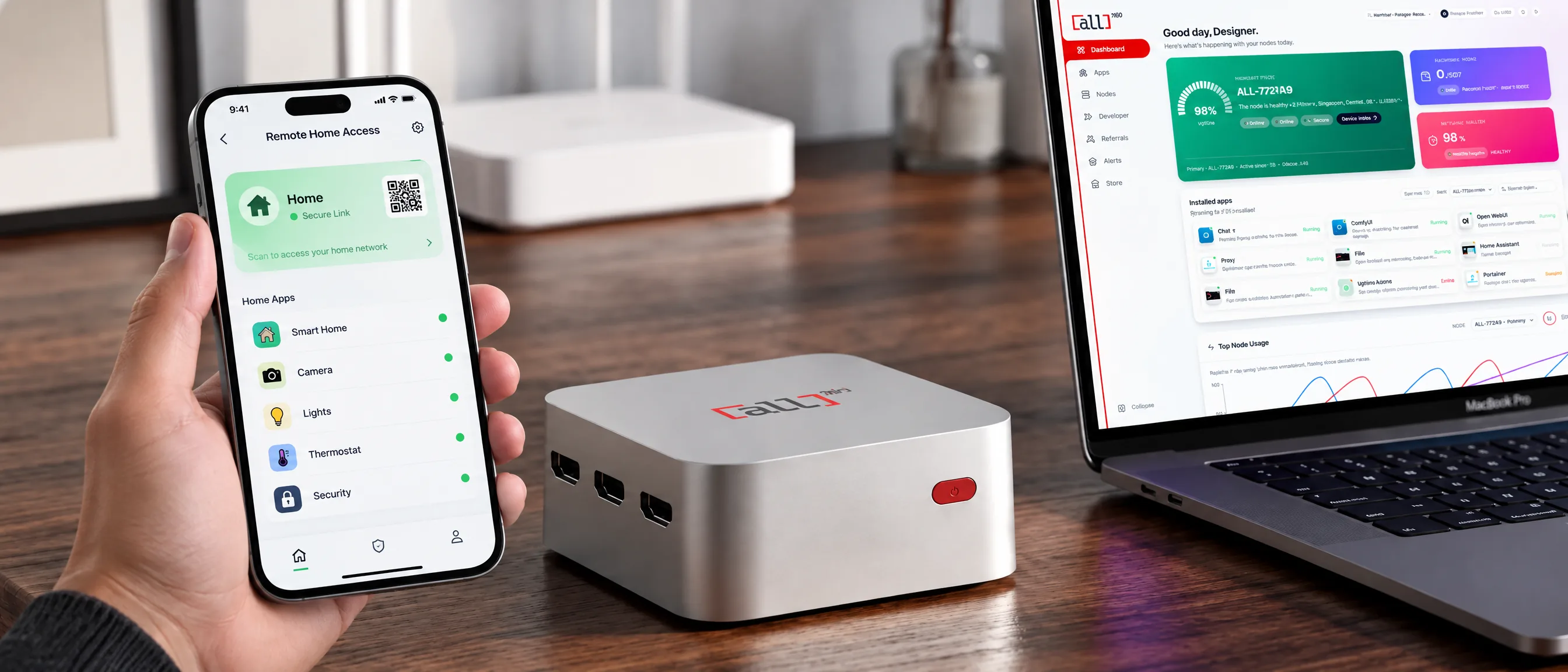
TeamViewer controls another computer's screen from afar, and anything beyond personal use needs a paid licence. ALL1 gives you secure access to the apps and files running at home through ALL CONNECT and the Home VPN, both included.
The short answer
ALL1 or TeamViewer?
Different tools for different jobs. TeamViewer takes over a screen. ALL1 makes your home apps and network reachable.
Choose TeamViewer if
- You need to see and control another computer's screen.
- You give remote support to family, colleagues or customers.
- You need to reach many computers across different places.
- You don't want any device at home.
Choose ALL1 if
- You want your files, photos, cameras and home apps available from anywhere, with no port forwarding.
- You want a Home VPN into your own network, plus 5 Premium VPN seats, included for 5 years.
- You want network-wide ad blocking and 100+ apps on the same box.
- You want a home server that can optionally work on the ALL network.
WATCH
ALL1 vs remote desktop in 20 seconds
Side by side
ALL1 and TeamViewer, side by side
ALL1 compared with TeamViewer. Prices in USD, 2026.
Price
Hardware
Included services
Features
Network
Capabilities only ALL1 offers out of the box.
Your home server
Run it on ALL1
Keep your apps on ALL1 and use the ALL CONNECT link or QR code to reach them without configuring port forwarding. Set up the included Home VPN to connect to your home network, rather than taking over another computer's screen. ALL1 and your internet connection must stay online.
Honest
Where TeamViewer is ahead
A fair comparison says this plainly.
- Screen control
- TeamViewer lets you see and operate a remote desktop. ALL1 does not offer remote screen control.
- Support use
- For helping family or customers with their own computers, a dedicated remote support tool is the right choice.
- No hardware
- TeamViewer runs on computers you already own. ALL1 is a device that lives at home.
Earn
Your home is reachable all day. So is spare capacity.
ALL1 stays on so you can reach home whenever you need to. When it has spare compute, bandwidth or storage, it can run approved workloads for verified businesses on the ALL network. You are paid for actual usage.
*50% node operator, 20% to community.
Earnings depend on real network demand, the apps you run, your uptime, bandwidth and location. They are not guaranteed and can be zero. ALL1 is sold as a personal server with bundled services, not as an investment.
You choose what runs
Set it to automatic or approve every app yourself. Anything can be stopped in one tap.
Only verified services connect
Every company and developer is vetted before reaching the network.
Apps stay in their sandbox
Each app gets only the resources it was granted. It cannot read your files or other apps.
Usage is metered, payouts follow
CPU, bandwidth and storage are measured. Your 70%* is paid in USD or USDC.
Included
Remote access, and the rest
A remote access licence does one job. ALL1 ships with these configured and included for five years.
Most relevant here
5 yearsHome VPN
Reach your home network securely from anywhere, whether you're at a café, a hotel or the office. Your apps, files and devices stay one tap away, with no third-party server in the middle.
5× Premium VPN
Five Premium VPN seats for your phones, laptops and family, each valid for 5 years. Browse privately on public Wi-Fi and any network through our VPN partner's servers.
Ad blocking
Network-wide ad and tracker blocking for every device on your Wi-Fi, including smart TVs and consoles that can't run a blocker. Nothing to install on each device, nothing to configure.
IoT integration
Bring your smart-home devices into one place, across brands, and control them from a single app. Set up routines once and let your ALL1 run them for you at home.
100 GB residential proxy, included
Every ALL1 comes with 100 GB of residential proxy traffic, worth about $500 at average market prices. Used it all? Top up any time at $2 per GB, an owner-only price.
One payment, no monthly fee for the bundled services during the 5-year period.
FAQ
Questions people ask
How do I get my own home VPN?+
ALL1 includes Home VPN plus 5 Premium VPN seats for 5 years. Connect ALL1 to your router, open the ALL OS console and follow the Home VPN setup prompts to connect your phone or laptop to your home network.
Can I reach my home network from anywhere without port forwarding?+
Yes. ALL CONNECT provides access to apps on ALL1 without port forwarding, while Home VPN connects you to your home network. Your ALL1 must remain powered on and connected to the internet, and your remote device needs a working connection.
What is ALL CONNECT?+
ALL CONNECT gives you a secure link and QR code to reach the apps running on your ALL1 from anywhere, without configuring your router. It is currently included.
Can I control my PC remotely with ALL1?+
Not directly. ALL1 makes your home apps and network reachable. For full remote desktop control, use a dedicated tool.
Is there a subscription?+
No. ALL1 is a one-time $599 purchase. Home VPN, 5 Premium VPN seats, ad blocking and IoT integration are included for 5 years, and ALL CONNECT remote access is currently included.
Do I have to share my ALL1 with the network?+
No. Run it as a private server only, approve each network app one by one, or set it to automatic. You can stop any app in one tap.
How much can I earn?+
It depends on demand for the apps you run, your uptime, connection and location. There is no guaranteed amount and it can be zero.
Your cloud. Your privacy. Your income.
$599 one-time · ALL CONNECT currently included
TeamViewer is a trademark of TeamViewer SE. ALL360 is not affiliated with, endorsed by or sponsored by TeamViewer SE. Competitor prices are taken from publicly available sources and were last checked in October 2026; they vary by region and may change, so please verify on teamviewer.com.
ALL1 specifications may vary by batch. ALL CONNECT terms may change. Network earnings depend on demand, uptime, configuration and location, are not guaranteed and may be zero. Bundled services are provided for 5 years under the ALL360 Terms of Service.
Bundled services, including VPN, Premium VPN, ad blocking, IoT integration and residential proxy traffic, are provided by external partners under their own terms.